The short answer: which prompt tools deserve your attention?
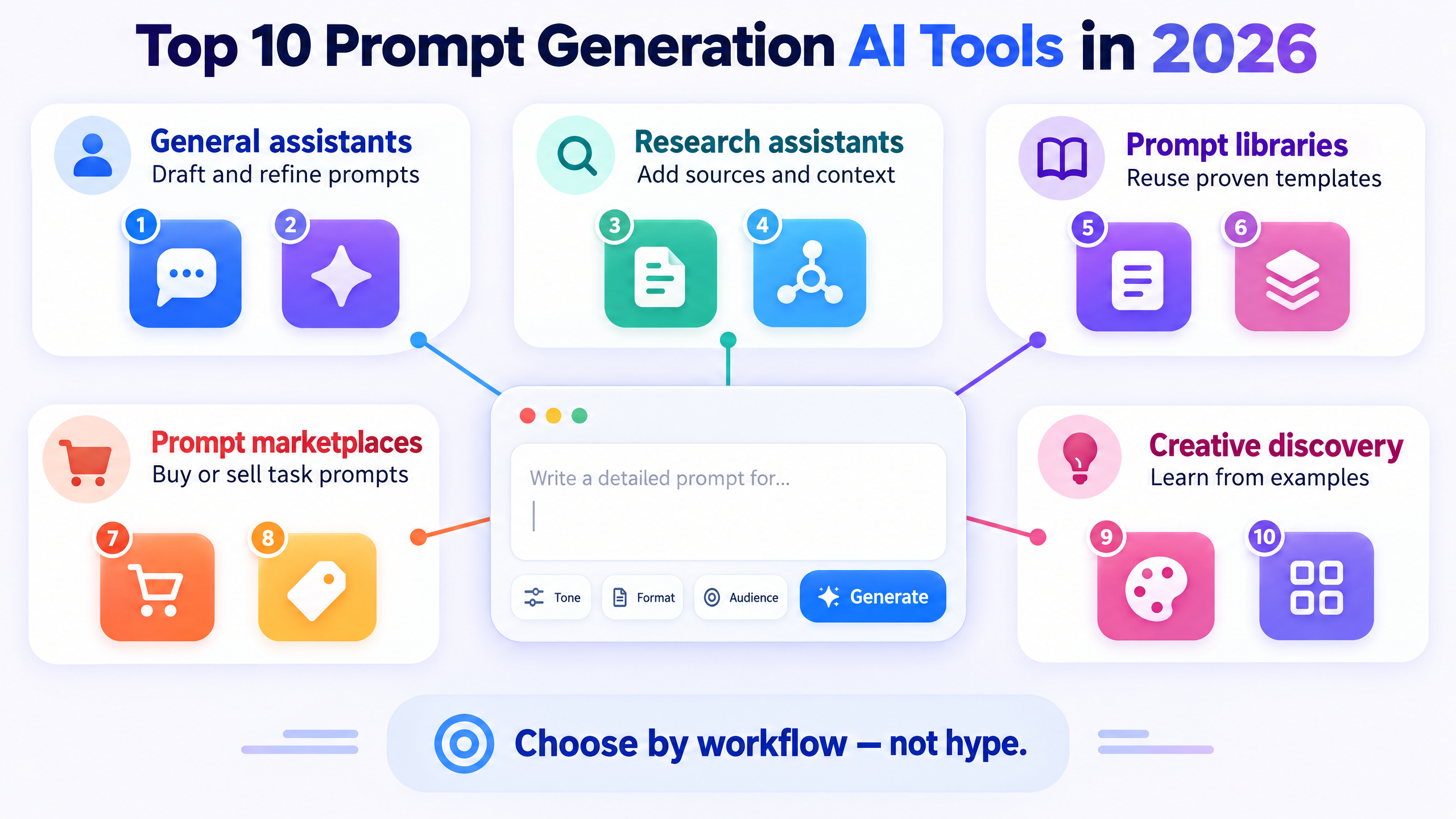
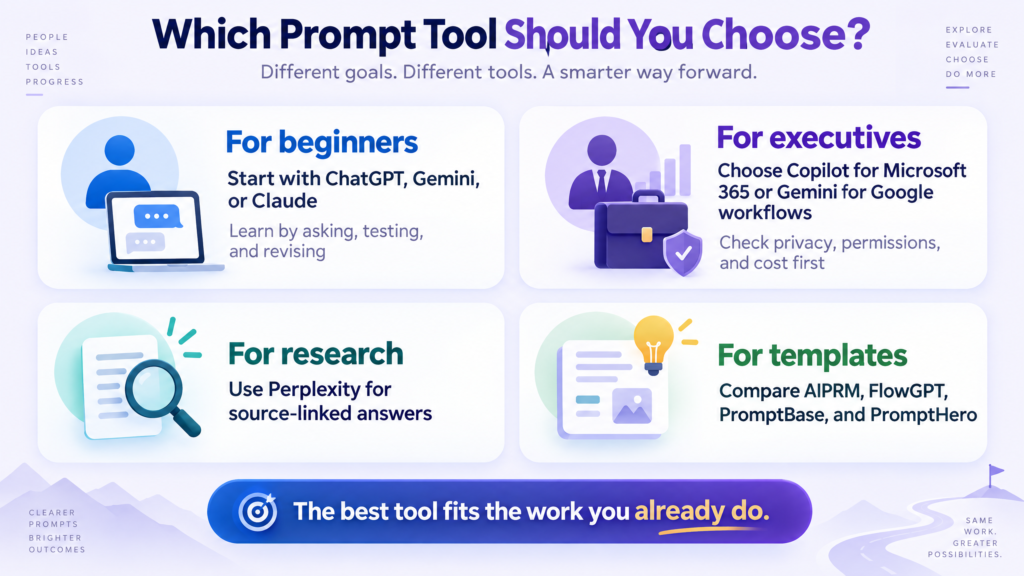
The Top 10 prompt generation AI tools in 2026 are not all the same kind of product. Some are general AI assistants that can write and refine prompts. Some are research tools that turn questions into source-linked investigations. Others are prompt libraries, marketplaces, or creative discovery platforms.That distinction matters. A beginner who wants help writing a first prompt does not need the same product as an executive who needs permissions, privacy controls, reusable instructions, and an audit-friendly workflow.If you want a quick recommendation, start with ChatGPT, Claude, or Google Gemini for conversational prompt drafting. Choose Microsoft Copilot if your work already lives in Microsoft 365. Choose Perplexity when research and source inspection are central. Use AIPRM, FlowGPT, PromptBase, or PromptHero when you want to discover and reuse templates. Treat PromptPerfect as a historical example rather than a new purchase recommendation because the research reviewed for this draft reports an announced end-of-availability date of September 1, 2026.The most useful answer to How to prompt AI in 2026? is also the least glamorous: state the goal, add context, set constraints, show an example, request a format, and test the result. A clever phrase is less valuable than a clear brief.My opinion: the best prompt-generation tool is usually the AI assistant your team already uses, provided you build a small testing habit around it.
What counts as a prompt generation AI tool?
A prompt is an instruction that guides an AI system toward a particular output. Prompt generation means creating, improving, organizing, or adapting that instruction. In practice, a tool may help in one or more of four ways:
1.Drafting: turning a plain-language goal into a detailed prompt.
2.Refining: adding context, constraints, examples, tone, or output structure.
3.Reusing: saving instructions so a task does not start from zero every time.
4.Discovering: finding templates, examples, or model-specific patterns created by others.
This is why a simple list of the Top 10 prompt generation AI tools in 2026 can be misleading. ChatGPT and Claude are broad assistants. AIPRM is closer to a prompt library. PromptBase is a marketplace. PromptHero leans toward visual prompt discovery. Perplexity is primarily an AI search and research product.
The 2026 prompt stack: from wording to governance
A simple prompt example
Weak prompt:
Write a marketing plan for my company.
Stronger prompt:
Act as a B2B marketing strategist. Create a 90-day marketing plan for a 40-person cybersecurity consultancy targeting operations leaders at mid-market manufacturers in the United States. Prioritize thought leadership, email, LinkedIn, and partner marketing. Assume a monthly budget of $12,000. Return a table with objective, audience, channel, weekly action, owner, cost, and success metric. State three assumptions and five risks.
The Top 10 prompt generation AI tools in 2026
1. ChatGPT: the flexible default for most beginners
ChatGPT is not a dedicated prompt-management platform. Its strength is conversational iteration. You can say, “Turn this goal into a robust prompt,” inspect the result, ask for a simpler version, add constraints, and then run the prompt immediately. OpenAI recommends iterative refinement and emphasizes being clear about the task, context, desired output, and constraints.ChatGPT becomes more useful when you use Custom Instructions for stable preferences and Projects for related chats, files, and project-level instructions. OpenAI’s current pricing page lists Free at $0 per month, Go at $8, Plus at $20, and Pro from $100, with features and usage limits varying by plan and region. Treat those figures as a point-in-time reference, not a permanent promise.Best for: beginners, writers, consultants, marketers, and executives who want one flexible assistant. Try this prompt: “Interview me with ten questions, then produce a reusable prompt for my weekly executive briefing.” Watch out for: confident errors, changing plan features, and assumptions that were never stated.
2. Claude: excellent for careful drafting and project context
Claude is another general-purpose assistant rather than a standalone prompt optimizer. It can turn a rough objective into a structured prompt, suggest examples, separate context from instructions, and critique the result. Anthropic’s guidance emphasizes clear instructions, relevant context, examples, XML-style separation for complex inputs, and empirical testing against success criteria.Claude’s project features help users reuse instructions and reference material across a recurring workflow. The free plan and paid plans have different usage limits; Anthropic’s current consumer pricing page lists Pro at $17 per month with annual billing or $20 month-to-month, while Max starts at $100.Best for: long-form writing, analysis, policy work, research synthesis, and teams that want project-level reuse. Try this prompt: “Rewrite this instruction for a cautious analyst. Separate objective, background, source material, exclusions, and output schema.” Watch out for: assuming a project automatically remembers everything from every separate chat.
3. Google Gemini: strong for Google-centered workflows
Gemini is a broad assistant with useful prompt-driven workflows inside Google’s ecosystem. Gems allow users to save repeatable instructions. Deep Research turns a question into a proposed research plan that can be edited before the system gathers and synthesizes information. Canvas supports prompt-driven documents, apps, slides, and code.Google’s consumer plan page lists a free tier and paid Google AI plans, but availability, limits, and pricing can vary by country, age, and account conditions. Google’s developer guidance still provides a useful prompting foundation: be clear and specific, provide context, define constraints, show examples, specify the output, and iterate.Best for: Google Workspace users, researchers, and beginners who like a guided workspace. Try this prompt: “Create a Gem for my weekly market briefing. Ask for missing source links, cite evidence, separate facts from assumptions, and return five executive decisions.” Watch out for: assuming a paid plan has identical features in every region.
4. Microsoft Copilot: the practical choice for Microsoft 365 teams
Microsoft Copilot teaches a simple prompt structure: state the goal, provide context, include source material, and describe the expected response. Its Prompt Gallery provides curated examples by task and work function. Microsoft also documents an optional Prompt Coach agent that can guide users through creating, critiquing, and improving prompts.Copilot’s business value is less about producing a clever prompt and more about applying prompts inside work people already do. Depending on licensing and account type, Copilot can work with files, email, meetings, chats, and Microsoft 365 applications. That power makes permissions and data governance essential.Best for: executives and teams already using Microsoft 365. Try this prompt: “Using the attached quarterly report and meeting notes, create a one-page board memo. Separate verified numbers from management interpretation and flag missing evidence.” Watch out for: assuming every account can access the same work data or Prompt Coach features.
5. Perplexity: best when research and citations matter
Perplexity is primarily an AI answer and search engine. It accepts concise keywords or detailed natural-language prompts, searches the live web, synthesizes a response, and links to sources. Its official guidance recommends specifying the instruction, context, inputs, keywords, and output format, then refining through follow-up questions.Projects let users keep searches, files, instructions, and domain preferences together. That makes Perplexity a strong option for market scans, competitor research, policy tracking, and source-first briefings. Citations improve inspectability, but they do not guarantee that every claim is correct or complete.Best for: research-heavy executives, analysts, writers, and students. Try this prompt: “Compare three competitors using their official pricing pages and latest product documentation. Cite every factual claim, show the access date, and label any inference.” Watch out for: treating citations as automatic proof. Open the primary source.
6. AIPRM: a prompt library inside the chat workflow
AIPRM helps users find, run, save, and organize prompt templates. Its official pages describe a large public catalog, community ratings, private prompts, custom lists, and controls such as tone and writing style. The product is closer to a prompt discovery and management layer than an autonomous prompt engineer.AIPRM can be useful for beginners who want a starting point for SEO, marketing, sales, and writing tasks. It can also help small teams create a shared collection of repeatable instructions. However, community prompts are not automatically perfect, and catalog-size claims vary across AIPRM pages. Treat those numbers as product claims that can change.Best for: users who want ready-made templates and private prompt organization. Try this prompt: start with a template, then replace generic instructions with your audience, source, constraints, and review criteria. Watch out for: browser-extension permissions and using public templates with confidential material.
7. FlowGPT: community prompts and reusable templates
FlowGPT combines community discovery with prompt creation and template workflows. Its documentation describes prompts with editable variables such as {subject:math}. Users can preview, test, tag, and publish templates. Its platform also lists an AI Prompt Creator designed to turn an idea into a customized prompt.This makes FlowGPT approachable for people who learn by browsing examples. It is less convincing as a verified enterprise prompt-governance solution because the sources reviewed do not establish rigorous prompt scoring, version control, or audit features. Its official pricing details should be checked inside the live product before publication because the fetched membership page did not expose a complete plan comparison.Best for: beginners who want examples, templates, and community ideas. Try this prompt: “Turn this one-off instruction into a template with three fill-in fields and a sample completed version.” Watch out for: dated documentation and assuming community popularity equals output quality.
8. PromptBase: a marketplace for prompts and prompt-powered apps
PromptBase is primarily a marketplace and app ecosystem. Users can discover, buy, sell, and apply prompts across text, image, video, coding, and other model categories. Its Select page advertises a large included library and monthly credits, while individual prompts vary in price.PromptBase is useful when you have a specific output in mind and want to study or purchase a model-specific starting point. It is not a guarantee that a purchased prompt will outperform a carefully written brief. Compatibility can change when models change.Best for: creators, marketers, and users who want model-specific templates or prompt-based apps. Try this prompt: before buying, ask “What model version is this prompt designed for, what input variables does it require, and how is success demonstrated?” Watch out for: seller quality, model drift, and marketplace claims that are not independently audited.
9. PromptHero: visual prompt discovery and experimentation
PromptHero combines a community prompt library with generative creation. Its pages cover model-specific examples across image, video, and text categories. Users can inspect creative references, study settings, and adapt ideas. Paid plans emphasize generation credits, privacy, speed, and access to models.PromptHero is a good fit for visual creators who learn by seeing what a prompt produces. The reviewed evidence supports discovery, reuse, and application. It does not establish a dedicated prompt-rewriting or quality-scoring workflow, so do not describe it as a guaranteed optimizer.Best for: designers, image creators, video creators, and visual marketers. Try this prompt: “Describe why this visual prompt works, identify its subject, composition, lighting, style, and exclusions, then create three variations.” Watch out for: community content rights and model-specific compatibility.
10. PromptPerfect: an important cautionary case
PromptPerfect was positioned as a dedicated prompt optimization tool. Jina AI described features for analyzing and improving prompts, working across text and image models, comparing models, and deploying prompts through API-oriented workflows. However, the official page reviewed for this article announced that the service would no longer be available after September 1, 2026.That makes PromptPerfect valuable as a historical case study, not a new-adoption recommendation. It shows why buyers should verify that a tool is active, supported, and aligned with their current model stack before building a workflow around it.Best for: historical research into prompt optimizers, not a current purchase recommendation based on the reviewed status. Lesson: always check the official product page, current pricing, support status, and export options
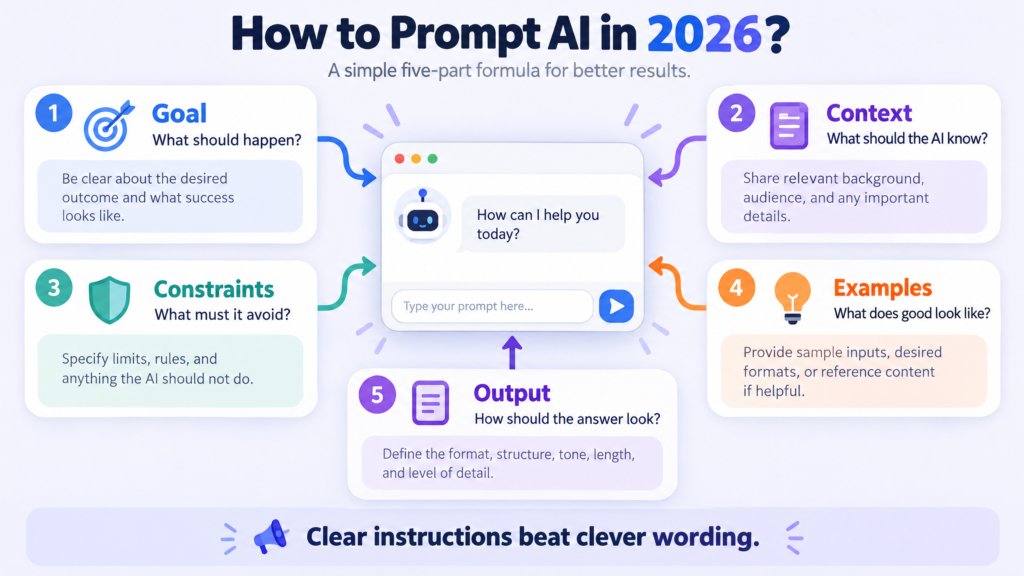
How to prompt AI in 2026? Use this five-part formula
1. State the goal
Say what the AI should produce and why. “Summarize this” is weaker than “Create a 150-word executive brief that helps a CFO decide whether to renew the contract.”
2. Add context
Give the audience, situation, source material, definitions, time period, and relevant constraints. Context prevents the system from filling gaps with guesses.
3. Add constraints
Specify what the AI must include, avoid, verify, or label as uncertain. Constraints are especially important for legal, financial, medical, brand, and executive work.
4. Show an example
One good example can remove ambiguity. If you want a particular voice or structure, show a short model output. This is often more effective than adding adjectives such as “professional” or “high quality.”
5. Specify the output
Ask for the format you can actually use: a table, email, JSON object, memo, checklist, slide outline, or ranked options. Tell the AI whether it should ask questions first.A reliable answer to How to prompt AI in 2026? is to turn a vague request into a testable specification.
A real executive example: from vague request to repeatable system
A vague request is:Give me a customer report.A better version is:Act as a customer-insights lead. Review the attached support tickets from Q3. Group issues into no more than six themes. For each theme, report ticket count, representative customer language, probable root cause, business risk, and recommended owner. Do not invent counts. Quote no more than one sentence per ticket. End with three decisions an executive team should make this month.The second version also tells the AI what not to do. That is critical. Good prompting is not only about adding detail; it is about reducing the number of ways the system can misinterpret the task.
Prompt testing: the habit most teams skip
Treat a prompt as a hypothesis. Define success before you judge the output. Then test the prompt on several representative examples, including an easy case, an ordinary case, and an edge case.
A simple scorecard can ask:
•Did the answer follow the requested format?
•Did it use the supplied source material?
•Did it separate fact from inference?
•Did it avoid invented numbers?
•Did it meet the tone and length requirements?
•Could another person run the prompt and get a similar result?